Showing posts with label All mobile PC Suites. Show all posts

Tuesday, July 27, 2010

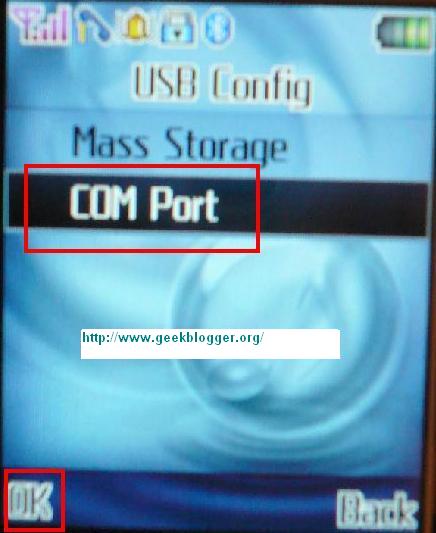
COM Port driver china mobile

Now you can easily get China Mobile PC Suite Download Free from here, i have found the China Mobile PC Suite which is in nature GENERIC ( can be used with any Chinese Mobile), This PC suite works on all versions of windows including vista, you need to select win2k folder as when you manually search for drivers in vista.


Download Links:


MT 6255 Driver Download (Used for USB connectivity to your PC)

Free China Mobile PC Suite Download (China Mobile PC Suite)

China Mobile PC Suite Manual
:

PhoneSuite provides various functionalities for users to manage their mobile phone easily on PC side. It will communicate with mobile phone via serial communication, IrDA or Bluetooth.


  • Phonebook is used to manage the contacts information between mobile phone and PC folder. In addition to adding, editing and deleting contacts, users can get the phonebook database on hand and backup them to PC folder. PhoneSuite also imports contact list from Lotus Notes, Outlook, and Outlook Express. Users can copy these information to the PC folder or mobile phone.


  • Message helps users to read, edit and send SMS/EMS messages directly from PC. Besides, you can create personal folders to categorize all messages on PC side.


  • Settings contains the system-related settings and message default settings. Users also can set whether they want to import contact list from other software or not here.


  • Images is used to draw images of various file types, and transport the images between PC and mobile phone. It also provides clip, mirror and rotate functions to reach user's expectation.


  • Melody provides a easier way to compose your own melody through the staff graphic interface. It is not only a editor but also provide the functions to transport the melodies between PC and mobile phone.


  • MMS Message helps users to read, edit MMS messages directly from PC. Users also can transport MMS messages between PC and mobile phone. Whether this functionality is supported or not depends on the mobile phone connects to PhoneSuite.


  • File Manager provides a friendly interface for users to manage their files between PC side and mobile phone. Functionalities of "copy", "paste", "delete", "rename" and "new folder" are provided in out tool. Besides, File Manager supports local java installation from PC side.


  • China mobile PC Suite

    PC Suite for China mobiles

    If you have Any Query don't hesitate to ask any damn question :-)

    Friday, July 23, 2010

    Download Latest Nokia Software Updater 2.4.5 and Ovi Suite 2.1.0.87

    Finnish mobile-phone maker Nokia has just released a new version 2.4.5 of its software Nokia Software Updater. The new iteration of the application comes towards users with support for Microsoft's Windows 7 operating system, as well as with improved USB connectivity. And the Nokia Ovi Suite 2.0 supports over 100 different Nokia S60 and S40 devices with more being added all the time. It should work on all Nokia devices based on S60 3rd Edition, S60 5th Edition, or S40 6.1 or newer. 
    Nokia Software Updater 2.4.5
    This beta release of the Nokia Software Updater will not install any pre-release of Nokia device software. If after installing you get a message ‘No software updates available,’ this means there is no new version of Nokia device software currently available for your specific product. Please note that your mobile service provider, operator or carrier may not have approved the latest Nokia device software available.”

    At the same time, the developing team says that the final release of the software solution is the one expected to include critical improvements, and that these interim releases come only with smaller bug fixes. Thus, the new flavor sports enhancements to the USB connectivity, and also comes with “What’s New” release notes, so that users are kept up-to-date with the novelties included in the application.

    “Nokia Software Updater is standalone device firmware update application, targeted for users who need quick update for device firmware. Feedback received from Nokia Software Updater Beta will also benefit Nokia Ovi Suite users, because improvements will be implemented also into Nokia Ovi Suite,” the developers also note.

    Most of you might have already learned that the Nokia Ovi Suite is the all-you-can-do application the Finnish handset vendor is pushing out to its users, and that it offers increased functionality, including device firmware updates, phone syncing and more. In comparison, the Nokia Software Updater is the software solution meant to offer users the possibility to quickly update their handsets via a Windows-based PC, and it can be installed on computers running under Windows XP, Windows Vista (64-bit, Home and Professional) or Windows 7. 
    System Requirements for Nokia Software Updater 2.4.5: 
    · 1GHz, or higher, Pentium-compatible processor
    · At least 256 MB of RAM (memory)
    · Administrator rights to install
    · High-speed internet connection

    . Windows XP / Vista / 7


    Nokia Ovi Suite Version 2.1.0.87 
    Designed from a clean slate, Nokia Ovi Suite offers a new, more user-friendly approach to Nokia PC software.In addition, this software is considerably slim and fast.The completely new user interface gives you easy access to your important files and information as all the functionalities are available within one window.

    Nokia Ovi Suite is intended as the only computer application you will need from Nokia. It will eventually replace the current Nokia PC Suite and its variants like Nokia Ovi Suite 1.x and Nokia Nseries PC Suite. Nokia Ovi Suite integrates also the main features from Nokia Photos, Nokia Software updater and Nokia Map loader.

    Here are some key features of "Nokia Ovi Suite":

    · Move messages, contacts, photos, videos, music and more between your computer, your Nokia device and share your photos on Ovi
    · Keep your Nokia device and computer in sync, update your Nokia device with the latest software, and keep your valuable content safe and accessible everywhere
    · Sign in with Nokia Account and discover a range of great Ovi services: share your photos and videos with your friends & family or download the maps you need


    What's New in This Release:
    · Contacts sync with Ovi.com - keep your contacts safe online
    · Video support - transfer, play and share your videos
    · Get new device applications (Independent Application Delivery, IAD) - keep your device applications up-to-date
    · Windows 7 support - extended support for new operating system versions
    · Contacts sync with Mozilla Thunderbird - support for new, popular desktop PIM applications
    · Error fixes and performance improvements
    · New languages (Hindi, American English and Ukrainian)

    System Requirements Ovi Suite 2.0:
    · 2GB hard disk space
    · 1GHz Intel Pentium 4
    · 64MB display memory
    · 512MB RAM
    · 1024x768 resolution
    · 24-bit color graphics card
    . Windows XP / Vista / 7


    Download Here
    Free Download Link for Nokia Software Updater 2.4.5: 
    Nokia Software Updater 2.4.5 (33 MB) 


    Free Download Link for Nokia Ovi Suite 2.1.0.87: 
    Nokia Ovi Suite 2.1.0.87.exe (93.7 MB)  

    Needed Latest Nokia PC Suite 7.1.40.1 Final: Download Here. 

    Download Free iPhone Configuration Utility 2.2.0.185


    iPhone Configuration Utility lets you easily create, maintain, encrypt, and push configuration profiles, track and install provisioning profiles and authorized applications, and capture device information including console logs. 
    Configuration profiles are XML files that contain device security policies, VPN configuration information, Wi-Fi settings, APN settings, Exchange account settings, mail settings, and certificates that permit iPhone and iPod touch to work with your enterprise systems. For instructions on how to use iPhone Configuration Utility, see the iPhone and iPod touch Enterprise Deployment Guide, available for downloading at:

    You can read Enterprise Deployment Guide -http://www.apple.com/support/iphone/enterprise/

    System Requirements:

        * Microsoft Windows XP Service Pack 3 with Microsoft .NET Framework 3.5 SP1
        * Microsoft Windows Vista Service Pack 1 with Microsoft .NET Framework 3.5 SP1 


    Free Download Link for iPhone Configuration Utility 2.2.0.185:
    iPhone Configuration Utility 2.2.0.185 (29.51MB) 

    Download MyPhoneExplorer 1.7.5 For Sony Ericsson

    MyPhoneExplorer 1.7.5 is a great application for Sony Ericsson Phones with unique features. Connect your phone via cable, bluetooth or infrared and you'll be surprised how easy and efficient you can manage your phone with this compact software. Since it's first appearance MyPhoneExplorer evolved into the most popular freeware tool for SE-phones and is constantly extended by new features. Support almost all phones.

    MyPhoneExplorer Features:

        * Adressbook - with direct sync to Outlook, GMail, Windows contacts, Thunderbird, SeaMonkey, Lotus Notes and Tobit David
        * Organizer with calendarview and direct sync to Outlook, Google, Sunbird, Thunderbird, SeaMonkey, Windows calendar(Vista), Rainlendar, Lotus Notes, Tobit David and net shared calendars (WebDAV, FTP, local)
        * SMS - archive, export, import, excessive messages,...
        * Filebrowser with cachesystem to minimize datatransfer, automatic photosync...
        * Set phoneclock based on atomtime
        * and much more. f.e.: calllists, edit profiles, control phone, memorystatus, phonemonitor,...


    Whats new in MyPhoneExplorer 1.7.5 released:

        * SMS-Import from PC-Suite Archive
        * better display for SMS (full unicode-support, Smilies, SMS-Pictures,...)
        * optional Spell-Checker for writing SMS. Install ASpell to use it
        * better Tooltip for Trayicon (on Vista and newer)
        * graphical display incl. Export for Monitor-Values
        * Duplikate-Search in SMS-Archive
        * portable Installation (optional)
        * Sync with Thunderbird 3, Seamonkey and Sticky-Notes (Win7)
        * some adaptions for new phone-models
        * fixed many bugs and some minor changes
    MyPhoneExplorer is basicly compatible with all Phones from SonyEricsson except XPERIA, P800i, P900i and P910i. Besides this there exists a few Low-Cost-Phones (f.e. T200i) which does not have a PC-Interface. If you are using a Symbian-Phone from SE please note: Its needed to install the PC-Suite first and the connection with MyPhoneExplorer is only possible throught USB-Cable.

    Free Download Link for MyPhoneExplorer 1.7.5:
    Download Mobile Master Professional v7.5.7


    Mobile Master Professional is a great tool and complete package of utilities for managing various brands of mobile phones. Mobile Master Professional support for Siemens, Sony Ericsson and Nokia, LG, Motorola, Samsung. 

    With Mobile Master Professional you can synchronize with Outlook, Lotus Notes, The Bat, Eudora, Outlook Express, Google calendar, Palm Desktop, Novell Groupwise, iTunes, and others. Mobile Master Professional enable you to download music, video, pictures, working with databases and telephone books. Besides synchronization allows upload and download files to iPods and mobile phones, send and receive SMS, backup data.

    Download Mobile Master Professional v7.5.7 Build 3162:

      Mobile Master Professional v7.5.7 (18MB)  

    Latest Nokia PC Suite


    A Free applications for Nokia phones that lets you edit, synchronize and back up many of your phone's files Latest released Nokia PC Suite 7.1.40.1 Final is a package of Windows-based PC applications developed especially for use with Nokia phones. Depending on your phone model, Nokia PC Suite lets you edit, synchronize and back up many of your phone's files on a compatible PC through a cable or wireless connection. Its free and useful application for all Nokia phones which support PC connectivity. 
    Here are some key features of Nokia PC Suite:
    · Back up and restore phone files
    · Transfer information, pictures, and music from phone to phone or phone to PC
    · Synchronize your phone and PC calendars
    · Edit contacts, pictures, and phone file names
    · Install Java-based applications in your phone
    · Convert ringing tone formats
    · Play multimedia messages and videos
    · Send text messages from the PC
    · Connect by using your phone as a modem

    System Requirements:

    · Nokia Mobile Phone connected to your PC
    · Available hard disk space: At least 300 MB of free disk space
    · Connection methods: USB cable, infrared (IrDA), or Bluetooth 

    . Windows 2K / XP / 2003 / Vista

    What's New in This Release:
    · Windows 7 support
    · Stability fixes
     

    Connection method compatible with your Nokia mobile phone:
    • Infrared (IrDA) port
    • Bluetooth via a supported stack: Digianswer Bluetooth Software Suite,
    • Microsoft Windows XP Bluetooth, or WIDCOMM Bluetooth for Windows 1.4
    • Nokia Connectivity Cable DKU-2 (USB) or Nokia Connectivity Adapter Cable DKU-5 (serial)


    Free Download Link for Latest Nokia PC Suite 7.1.40.1 Final: Nokia PC Suite 7.1.40.1 Final